Semantic Versions on shared libraries
Semantic Versions
The Semantic Version system is a way to classify changes into three categories, based on how they affect compatibility with earlier releases. A version in the format X.Y.Z (or MAJOR.MINOR.PATCH) is used to communicate which types of changes have been added to a new release.
For changes that don’t affect compatibility at all, because the programming interfaces (or other interfaces) haven’t changed, the patch version number (Z) is incremented. For changes that are backward compatible, such as the addition of a new feature, the minor version number (Y) is incremented. If there are changes that could break compatibility with some applications, the major version (X) is incremented.
In this article, we’ll be looking at minor version changes which create a ratcheting compatibility structure, how they allow libraries to update with or ahead of applications, and why applications can’t update ahead of libraries.
Shared libraries
Let’s imagine a shared library that provides functions for calculating
basic characteristics of shapes like rectangle. This library is named
libFoo
The first version of this shared library provides a function named
rectangle_perimeter, and this version is numbered 1.0.0.
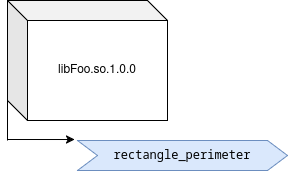
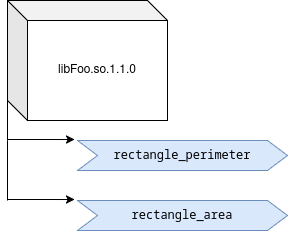
Later, developers add functions to the shared library to calculate
area. The new version still provides the same functions the previous
release did, but adds some new ones. Therefore, it’s backward
compatible. This version is numbered 1.1.0. The first digit
indicates that this release implements version 1 of the interface,
just like the previous release. The second digit indicates that the
interface has been extended with new functionality. Interface version
1.1 has features that were not in interface version 1.0.
Applications
libFoo is useful for developers, but users would like to use this in shell scripts, too. A developer decides to write a command line tool that exposes the functions of the library.
There’s just one challenge… libFoo-1.0 is available in
Hypothetical OS version 7, and libFoo-1.1 is available in HypOS 8.
The developer wants the tool to be available to all of HypOS’s users,
even if they haven’t upgraded yet. After all, HypOS 7 is still a
supported release.
So the developer writes an application that checks the system when it builds to see what features are available. If you’ve ever run “./configure”, you might have seen it “checking for…” some feature.
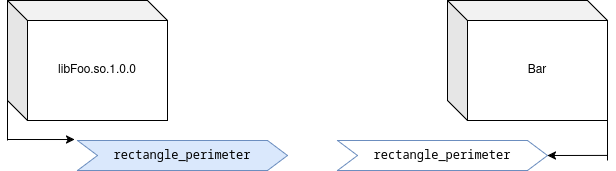
If you run ./configure on HypOS 7, the configure script will find
that libFoo does not have area functions, and it will build an
application that references only the perimeter functions.
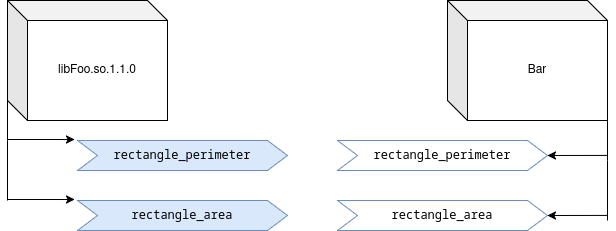
However, if you run ./configure on HypOS 8, the script will find
that libFoo has area functions, and it will build an application
that references both perimeter and area functions.
There are several ways applications might get dependencies, some implicit.
There are various ways that check might be implemented. The build scripts might test `libFoo` for the functions, directly, by trying to build a sample program that uses them. If they aren't available, building that sample program will fail. In some cases, a shared library might describe its interface version in its API headers and a program might include a section that will be compiled when the version is new enough and an alternate section that will be compiled when it is not. In some cases, the program doesn't even need to actively check for interface changes. Some libraries will simply "define" a macro that refers to a function, which they change in a later version to refer to a different function. Applications that use that macro will require different functions based on what was available when they were compiled.This system supports upgrades
The system used on GNU/Linux and many other platforms is designed to allow the OS and shared libraries to be updated without breaking compatibility with applications.
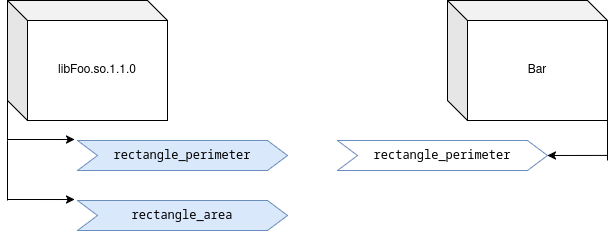
On a system that includes libFoo.so.1.0.0 there will be a symlink
that includes only the major version. libFoo.so.1 will be a link to
libFoo.so.1.0.0, and an application will link to libFoo.so.1
rather than directly to libFoo.so.1.0.0. This way, when the library
is updated to a new version that’s compatible, the application doesn’t
need to be recompiled. When the library is updated to
libFoo.so.1.1.0, the symlink will update as well, and the
application will continue to run, using the new library.
As long as the new library contains all of the functions that the application needs, it is compatible with the application.
The inverse is not generally true
If you were to take a build of the application that was intended for HypOS 8 and try to run it on HypOS 7, it probably wouldn’t run. Depending on the build configuration, it might fail to start at all, or it might crash when it tried to use the area functions. (It’s also possible, but uncommon, to write applications in a way that they start, test for the area functions, and do not try to use functions that do not exist.)
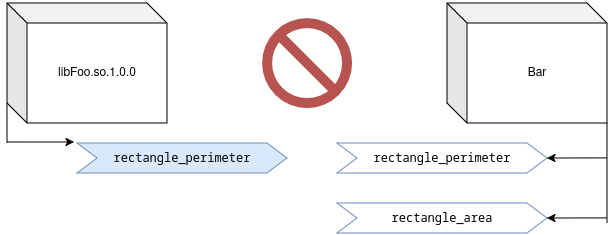
An application built with a new library will typically not be compatible with older systems. This is a job for package managers and dependency generators.
Explicit minimum requirements
Earlier, I described a hypothetical Bar application that supported
both libFoo-1.0 and libFoo-1.1. Suppose, instead, that Bar-1.0
had no explicit support for libFoo-1.1. Even when you compiled
Bar-1.0 on a system with libFoo-1.1, it still only requires the
rectangle_perimeter function.
In this case, Bar does not gain a dependency on libFoo-1.1 as the
minimum compatible version until it explicitly add support for the
features that were new in that version, and builds a binary that
supports (and therefore requires) them.
Implicit minimum requirements
Sometimes, however, the minimum requirement can be set without
changing the source code for Bar, at all. Rather than an explicit
choice or action by the application developers, the minimum version
could be implicit due to changes in libFoo.
For example, suppose that libFoo-1.3 adds a new feature,
rectangle_is_square. This function takes the dimensions of a
rectangle as arguments, and returns true or false. Bar explicitly
adds support for that feature. However, the implementation of
rectangle_is_square is flawed, because the API takes the dimensions
as double types. Two values might not be the same binary
representation in memory, but might be close enough to be considered
“square” for an application’s purpose.
The developers don’t want to break binary compatibility, so they add a
new function to version 1.4, rectangle_is_square_eps which takes a
third argument that specifies the desired precision, and they mask the
old function for new application builds using a macro:
#define rectangle_is_square(w, h) rectangle_is_square_eps(w, h, 0.0001)
If Bar is built on a system with libFoo-1.4, then the minimum
version required to run the resulting binary will also be
libFoo-1.4, even though the developers of Bar have not explicitly
adopted any of its features. This version became the minimum
implicitly.