Dependency generation
Because dependencies are created dynamically when compiling software, and because most applications distributed in an incomplete form with the expectation that the OS will provide the parts that are missing, software developers and distributions need a way to communicate what is needed in order to make an application complete, and allow it to run.
On POSIX systems, an application will typically detect the features available on the system where it is built, and adapt itself to use the newest features in that system. By doing so, it makes the features of that system a requirement (or dependency) of the resulting binary build.
For example, if you build the hypothetical “Bar” source code on a
system where libFoo provides both perimeter and area functions, then
the resulting binary will require a version of libFoo with both
perimeter and area functions, in order to run.
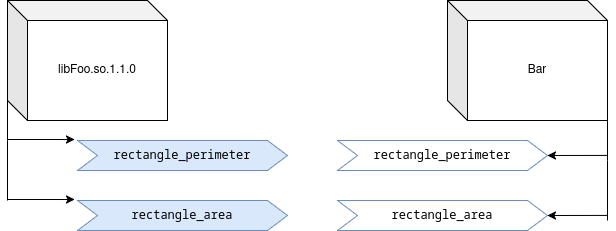
Now, in order to distribute that build of Bar, the developer or
distribution should include information with the application so that
the application’s dependencies can be installed at the same time, and
so that users don’t have to run the application, observe any failures,
install dependencies, and retry (a process that has been called
“dependency hell”).
The application Bar indicates that it needs libFoo.so.1, so it’s
easy to include that information with the application. But that
information may not be sufficient. A system that includes
libFoo.so.1.0.0 will have libFoo.so.1, and such a system would
appear to satisfy the dependencies listed for the Bar application,
even though it doesn’t have the area functions.
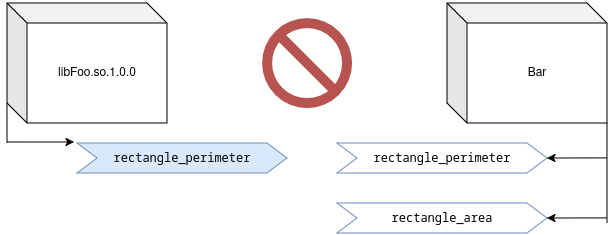
The Bar application requires the area functions, but nothing about
libFoo.so.1.1.0 indicates when those functions were added.
Distributions have a number of options.
Do nothing
A distribution might choose to do nothing and provide only the semantic “major” version of the dependency (which the soname suffix effectively provides.)
Requires: libFoo.so.1
In this case, some users might install a binary that requires features
of libFoo.so.1 that aren’t present on the system, and that binary
won’t run.
Use the version from shared library file name
The build system can determine that Bar needs libFoo.so.1 to run,
and that libFoo.so.1 is a symlink to libFoo.so.1.1.0. It could
treat 1.1.0 as a version and mark that as a minimum, because the
binary application will not depend on any features that will be
introduced in later versions, but it might depend on features that
were introduced at any point up to and including version 1.1.0 of
the library.
Requires: libFoo.so.1 >= 1.1.0
Some developers might see this as overly strict, because the required
features might have been introduced much earlier and the resulting
build might run with older versions of libFoo.so.1.
For example, if Bar did not support any area calculations, building
it on a system with libFoo.so.1.1.0 would still result in a binary
that only required rectangle_perimeter, and libFoo.so.1.0.0 would
provide that.
Use the version from the package database
Using the version from the library name, as above, might not be useful in all cases, because some library developers don’t provide one. That version doesn’t actually have any function, other than being a human-readable indication of the age of a library, so some developers don’t bother with it at all.
On systems where software is managed by a tool that tracks the version
of each component, there might be supplementary information. After a
build, the system might determine that Bar needs libFoo.so.1 and
libFoo.so.1 is a symlink to libFoo.so.1.1.0 and that this file was
provided by version 2.0 of the Foolib package. (Project versions
often do not match the versions of the shared libraries they provide!)
Requires: libFoo.so.1 >= 2.0
In some cases, this approach will provide a version even for the libraries where no version appears in the filename, but like the approach above, it might be too strict.
Use a database of features and their original version
Software distributions could track each build of every shared library to create a database that describes the features they provide, and the version in which that feature was introduced.
In the previous two examples, a minor version of the dependency is implied. In this approach, the minimum version is much more explicit.
The system might describe the history of libFoo.so.1 using project
versions, where version 1.0 provided libFoo.so.1.0.0 with the
perimeter features and version 2.0 provided libFoo.so.1.1.0 with
area features:
libFoo.so.1:
 rectangle_perimeter 1.0
 rectangle_area 2.0
Now, when the Bar application is built, the binary can be examined
at the end of the build to see not only what shared libraries it
needs, but what functions it requires. The system can express a
dependency on the latest version associated with any symbol that is
needed.
If Bar contains references to rectangle_perimeter, then it might
require only version 1.0:
Requires: libFoo.so.1 >= 1.0
But if Bar contains references to rectangle_area, then it might
require version 2.0:
Requires: libFoo.so.1 >= 2.0
(This is more or less how Debian handles dependencies)
This system works well for users, but it requires distribution maintainers to track information about library features, which is a lot of overhead. There is also the risk that because the information is maintained by a downstream distribution, it may only be as accurate as the distribution’s builds are complete. If the distribution does not build every release that the developer publishes, it may list a symbol with a version other than the one in which the developer actually introduced it.
Use versioned symbols
Rather than requiring distributions to keep an external database, shared library developers can embed information about semantic minor versions directly in their shared libraries, through the use of versioned symbols.
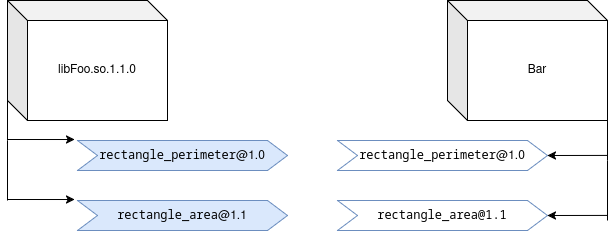
Like the previous approach, versioned symbols provide the informaion necessary to explicitly specify a minimum version that is no more strict than required by the features that are used. But because the shared library’s own developer maintains this information, results will be much more consistent from system to system.
Shared library "symbol versions" are really text labels.
Even if they look like a version, they can't be sorted, and dependency expressions need to list every "symbol version" needed. In this way a "symbol version" is more like a feature label than it is like a numeric version.If Bar references both rectangle_perimeter and rectangle_area,
then it needs both the 1.0 and 1.1 feature sets:
Requires: libFoo.so.1[1.0]
Requires: libFoo.so.1[1.1]