Security Showdown: Long term support vs short term release model
This is a rough transcript of a talk I gave at SeaGL ‘26.
The security characteristics of LTS vs regular release models haven’t fundamentally changed over the last 30 years, but the general community sentiment toward them has. As adversaries develop and adopt better tools, it becomes increasingly important to understand the difference between long term and short term release models.
This talk will explore the basic challenges that exist in keeping LTS systems secure, especially as they continue to ship code that is no longer maintained upstream.
Description:
This talk will cover: different interpretations of security as a characteristic of a product, the difference between stable software and unmaintained software, what patch frequency actually says about security, the purpose of LTS systems, how LTS systems are developed and maintained, previous studies about security vulnerabilities, and some guesses about how things will change in an era where our adversaries use AI tools to accelerate the discovery of vulnerabilities and the deployment of exploits.
All other things being equal, who here thinks that an LTS system will be more secure than a short term release? Please raise your hand.
Who thinks that a short term release will be more secure?
Before we talk about the LTS systems you’re familiar with, I’d like to announce a new ultra long term support distribution: OuroborOS.
Every release of OuroborOS will be supported for 10,000 years. There will be a new release every 4,000 years, which means that users can upgrade from one release to the following, or to the release after that.
It’s important to know when security patches for your system will be released so that you can plan your maintenance accordingly. OuroborOS patches will be released on the first non-holiday Monday… of each century… at 08:00 UTC.
Show me hands again… who is interested in this system?
A lot of people believe that “LTS” is necessary for production environments. The best system isn’t the one with the longest release cycles, it’s the one that’s long enough to support your operations. Your approach to security is defined in part by whether you want longer releases, or whether you want to deploy more often. Both of those are valid options, and both have different advantages and costs.
I’ll tell you a little bit about myself. I’ve been developing software and managing production networks since 1997.
Over the last 30 years I’ve worked in a lot of different environments. I’ve worked in small businesses. I’ve worked in the kinds of “enterprise” environments that favor LTS releases, like Salesforce. And I’ve worked high-tech, high security environments like Google that take basically the opposite approach. Most of my work experience is either SRE or development work. One thing that has been consistent in my professional history is a focus on security, vulnerability mitigation, and compliance issues.
Do any of you remember the 2024 XZ Utils attack? After that event, I wrote a security scanner that examines a running process to look for evidence of function hijacking, which is the class of attack that was used. Several Fedora packages use that scanner in CI jobs to alert if similar attacks are launched in the future.
Which is to say that I care a lot about security topics.
I work for Red Hat, but I’m not here as to represent Red Hat. The views I’m presenting here are not my employers, they are my own. I’m not here to sell you RHEL, or to try to convince you use Fedora.
I want to be really clear about that because I am going to say some things that you will probably interpret as criticism of Linux distributions, but I’m not here to criticize distributions or to tell you that you shouldn’t use them.
The message I want you to take away is this: that you should participate in the maintenance of the software that you use, and you should use software that is actually maintained.
I believe that many of you are using software that is neglected.
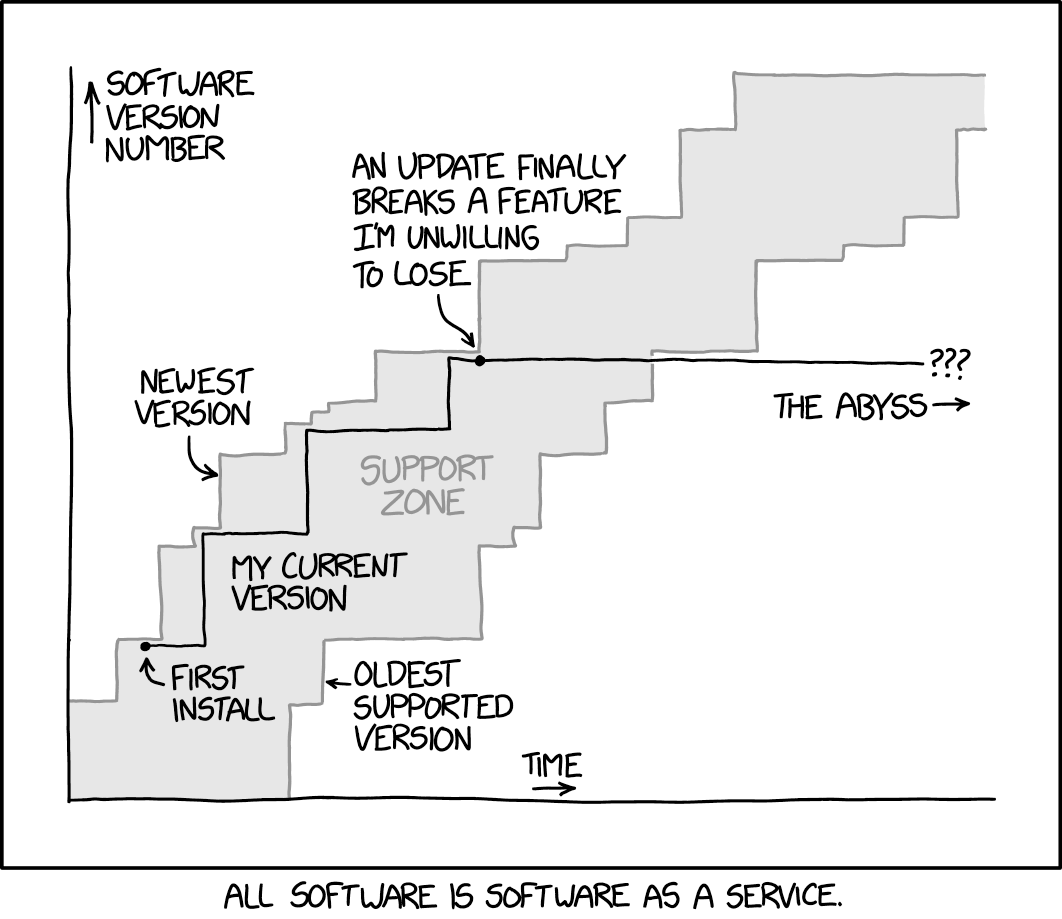
Neglect is a not maintenance strategy.
As is often the case, XKCD provides a useful illustration here. The illustration is a little clumsy, but it depicts a user’s upgrade path through maintained versions, and ultimately, a point at which they stop upgrading to new versions and continue using one after its maintenance is discontinued.
I think we all recognize and agree that Randall’s system is not more stable when he stops updating. He’s simply using unmaintained software.
Unmaintained is not stable.
If you’re using an LTS system with a large package collection, then that’s probably what you’re getting from many of the packages. Not stable software, but unmaintained software.
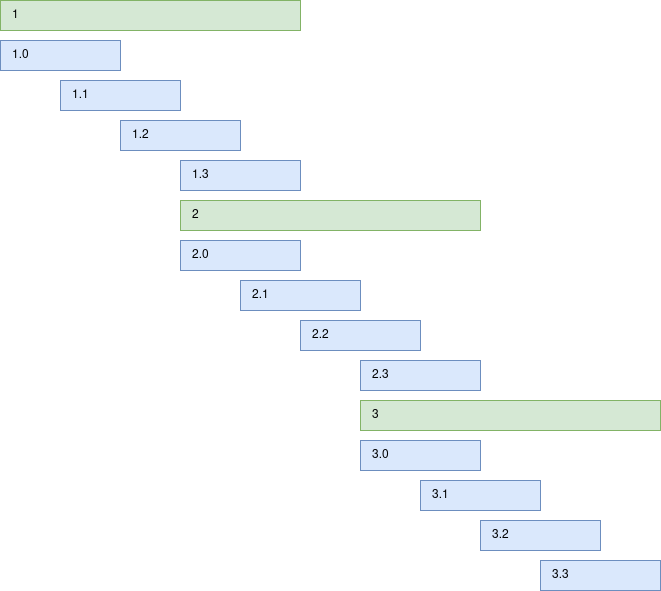
Many Free Software developers release every 6 months and maintain a release series for 12-18 months. They do this so that they can get features out to users on a regular basis, without forcing them to immediately accept feature updates.
Some of you may be familiar with the philosophy expressed as “Release early, release often”. If you are releasing often and maintaining release series long term then you are maintaining a lot of releases simultaneously. That’s a lot of work, and since most of this software development is unpaid work, developers tend not to make their workload larger by maintaining a lot of release series.
Capping lifetimes on a software release is part of workload management.
LTS systems present themselves as a substitute maintainer. They promise to carry on maintenance of a release series after an upstream developer discontinues it.
Doing that well requires a developer to follow the main development branch, to review work that gets merged, and to merge fixes for bugs that will affect their own users into their LTS branches. But because that requires a human to review all of the changes in the main branch and remain aware of development there, it’s an expensive endeavor.
Most distribution packages aren’t maintained by a developer involved in the project, and as a result, Free LTS systems don’t have nearly as much coverage as their users think they do.
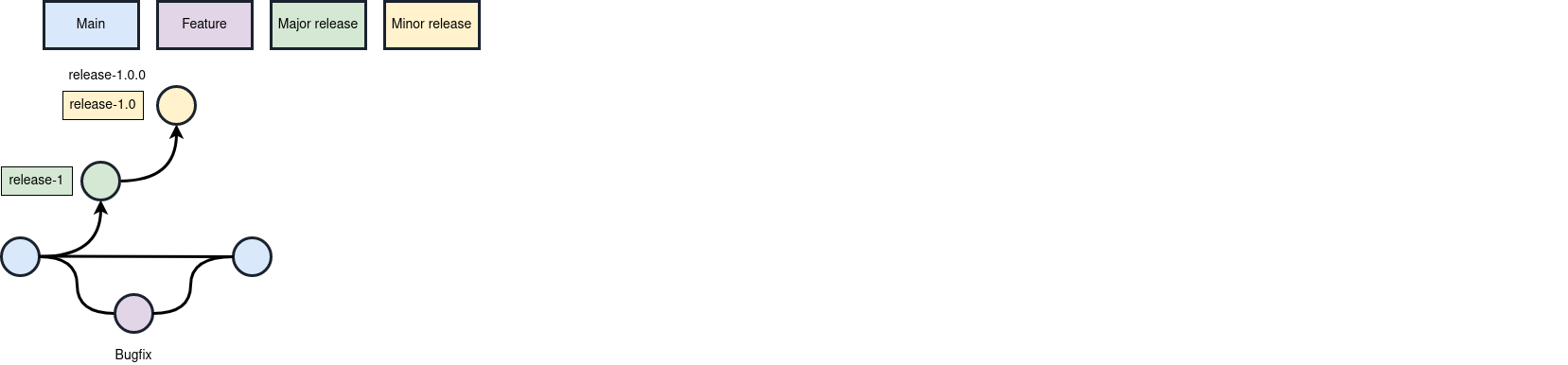
I assume that at least some people in the audience are not software developers and have not maintained stable releases. Software development practices aren’t really the main point of the talk, but I do want you to understand what it means when I say they’re expensive. I hope that illustrating the process will help you understand why very few projects are maintaining LTS release branches upstream.
This process isn’t the only way to develop stable releases, but it is probably the simplest and most straightforward one.
Hypothetically, we start with a simple project. It has a main development branch whose commits are blue. Changes that a developer prepares and tests are purple, and those merge into the main development branch. Once changes are merged to main, the developer can cherry-pick them into a release branch. Many of you are familiar with distributions and the term “back porting”. Back porting and cherry-pick are synonyms. You take a change, and you apply it to an existing release series.
So here, in this illustration, there’s one change in the main branch that is not yet in a release.
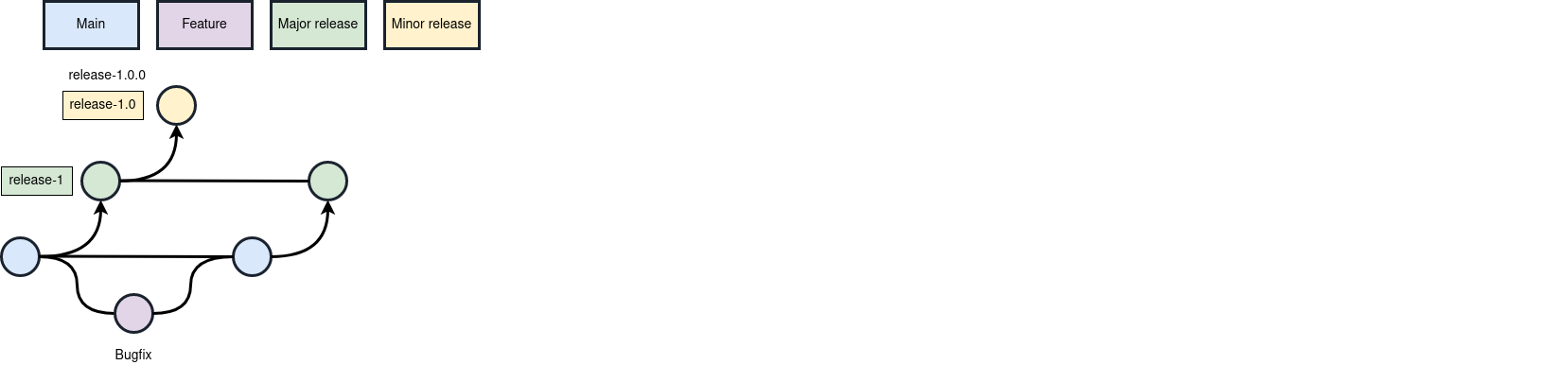
From there, the developer cherry-picks that change into the major release branch…
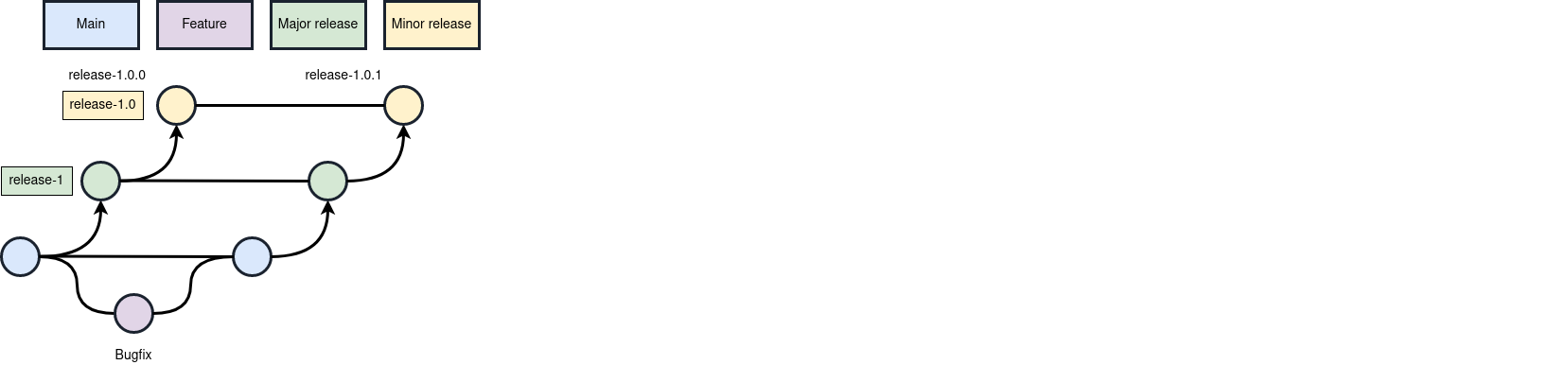
And then they cherry-pick it into the minor release branch. At that point, they can publish a new release.
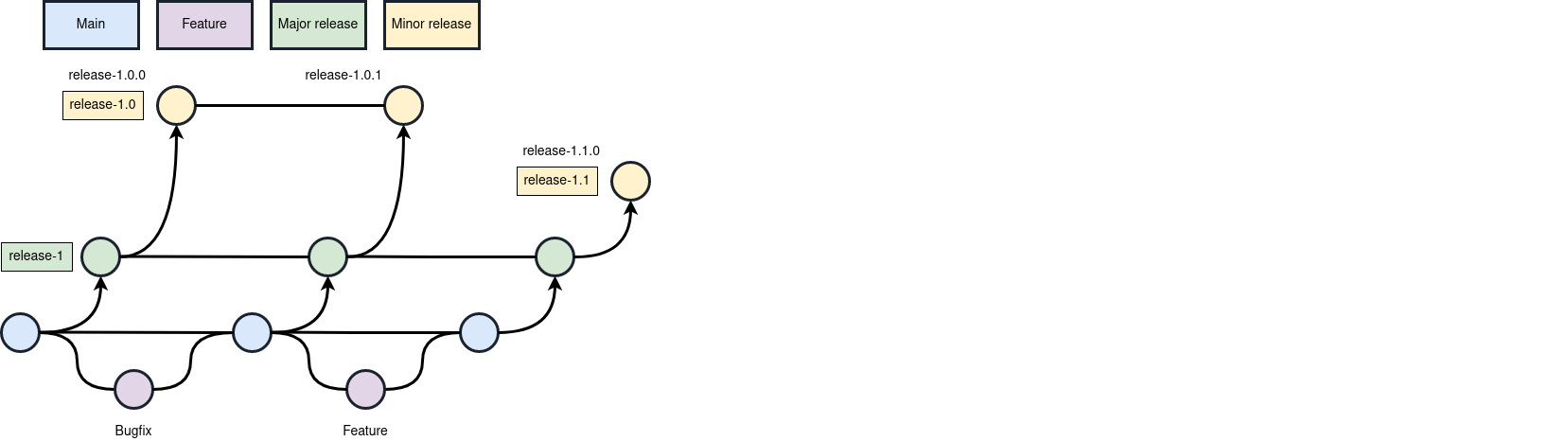
If they develop a new feature, they don’t want to merge that into a feature stable branch, so they cherry-pick the feature into the major release branch, and then they create a new minor release branch. Now they have a 1.0 release series and a 1.1 release series.
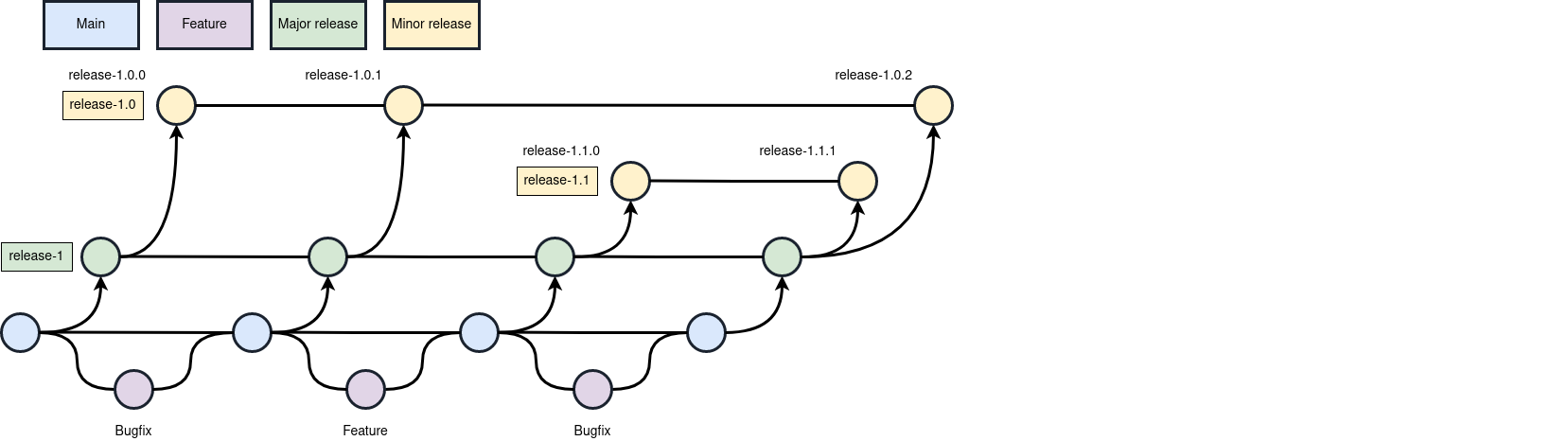
Now there are three release branches, and when a bug fix is developed in the main branch, it gets cherry-picked into the major release branch, and from there into each of the minor release branches.
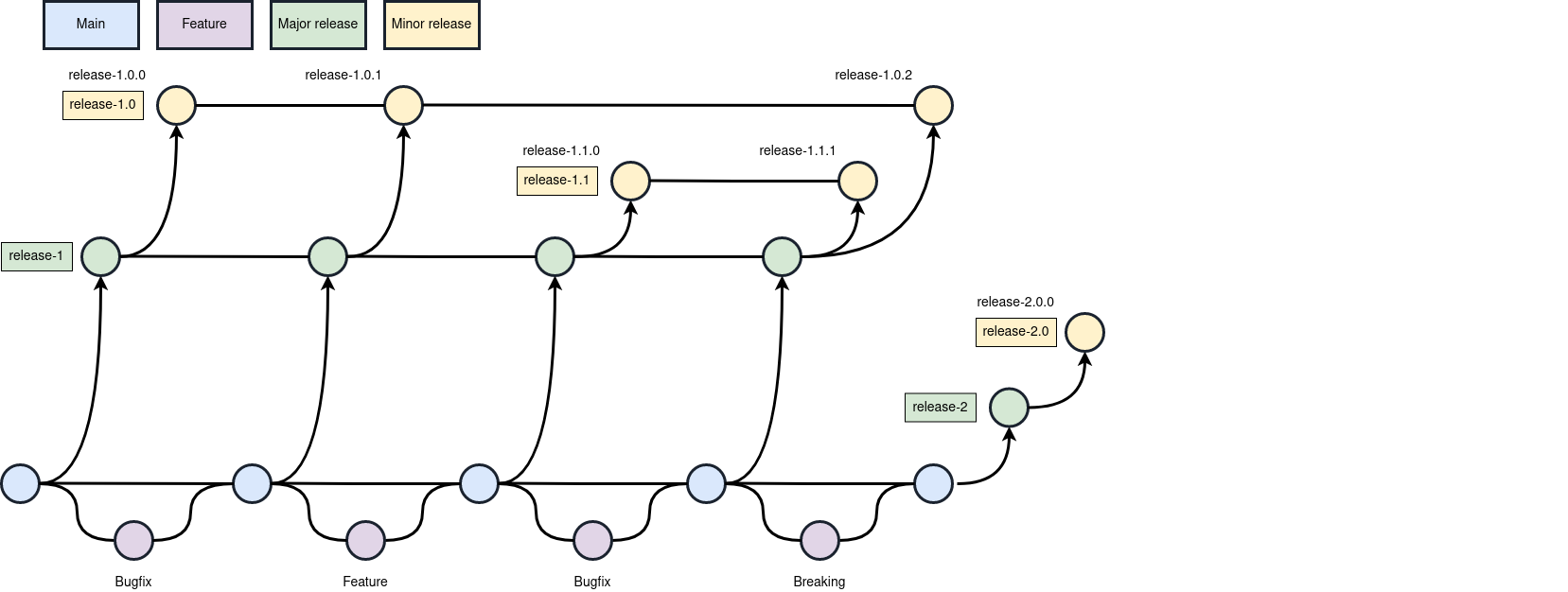
When there are changes that break backward compatibility, such as removing a feature that the developer believes is no longer necessary, they need a new major release branch, and a new minor release branch for that major. Now they have a release branch for version 2.0.
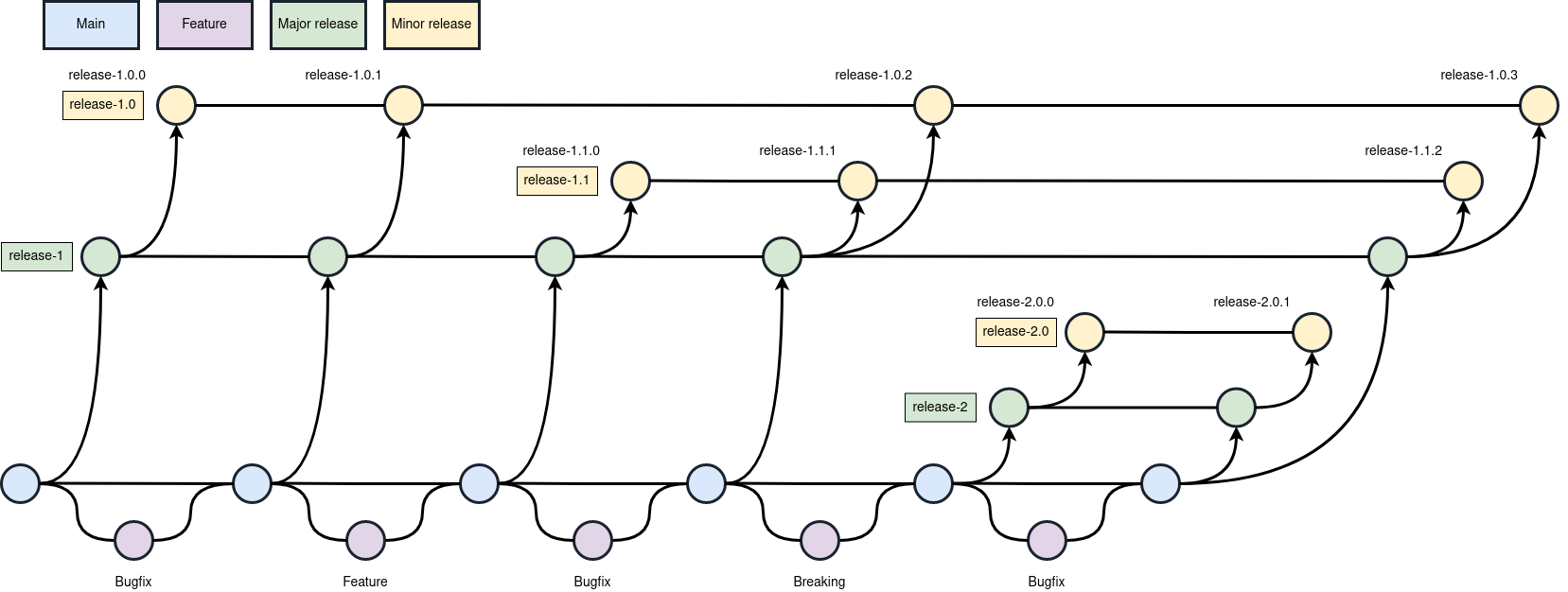
And, when there are bug fixes developed, those have to be cherry-picked into two major release branches and from there into three more minor release branches.
Maintaining stable releases involves a lot of process overhead.
…and I hope that helps clarify why developers don’t maintain a release series indefinitely. In this diagram, a developer is typically maintaining three releases at the same time, with some periods during which they’re only maintaining two. Keeping the workload more or less constant is part of keeping the project sustainable.
If we’re going to talk about which model is more secure, we need to define “secure.” When I talk to people about security, I notice several prominent themes in their definition of “secure”:
- Fewest known and unpatched vulnerabilities
- Fewest unknown, not-yet-discovered vulnerabilities
- Best defensive capabilities
The trick is, it doesn’t matter which one you pick. All things being equal, the most recent release series is generally the most secure one.
When vulnerabilities are reported and fixed, they are virtually always fixed in the main development branch first and then fixes are ported and applied to older branches. The further back you go, the less likely it will be viewed as important enough to back port, especially as it becomes increasingly difficult to back port to older branches because they diverge more from the main development branch. A fix in the main branch is less likely to apply to older stable releases without changes. And even when a release is still being supported, developers might decide that the cost of fixing a bug is greater than users need for that fix. So, it’s the newest release that’s most likely to get fixes for CVEs as they’re discovered.
The average life of a vulnerability is around 5 years, so the list of undiscovered vulnerabilities doesn’t really start to burn down until well into an LTS release cycle, at which point you have probably upgraded to a new release.
And it should go without saying that new defensive capabilities appear in new releases first.
For this talk, though, we’re going to focus on the first definition because that is the characteristic most commonly used within the security industry.
In a little while, we’re going to look at numbers that illustrate that point.
The single most important property of a secure system is that someone is still maintaining the software. A vulnerability doesn’t get fixed by the label on the box. Merely calling something “LTS” does not fix vulnerabilities. Someone has to write, test, and ship a patch.
We’re using the standard definition of the term “secure”, which is the fewest known and unfixed vulnerabilities. Vulnerabilities are discovered over time, and if they are not fixed, they accumulate. Therefore an unmaintained system becomes less secure over time.
The same thing is true for an LTS system, for every vulnerability the maintainers choose not to fix or don’t have the labor to fix, and every report they don’t have the labor to review.
A lot of people believe that LTS systems are more secure because they get fewer patches, but that is backward. Getting fewer patches is not the same as needing fewer patches. It’s true that patch frequency tends to be higher early in a release series, but when you patch and there’s nothing pending for some component, the absence of a patch does not itself tell you whether the software is secure, or if the software is unmaintained.
Silence is not a signal.
If you treat patches as evidence of anything, you should prefer the software that is consistently getting patches. That tells you that the developers are still there, and maintenance is still active.
Maintenance is good. “Stable” is a word that describes software that someone is still maintaining.
Software that no one is patching isn’t stable, it’s unmaintained. Stable and unmaintained are opposite conditions, but if you think that “no pending patches” is a sign that software is stable, it’s hard to differentiate the two.
LTS systems do have a purpose. I’m not saying you should not use them. What I am saying is that security isn’t that purpose. Security is a desirable characteristic, but that’s not the primary function of the LTS model.
The purpose of an LTS release is compatibility… compatibility with third-party software that runs on the OS, with third-party network services that the software interfaces with, and with an application ecosystem that was released at around the same time.
Compatibility is the priority.
LTS systems are highly desirable in industries like banking, military, automotive, medical, industrial control and safety systems… these are environments with heavy regulatory or contractual obligations. They tend to have expensive, time consuming validation processes for changes, and especially for non trivial changes.
They’re environments where the word “recall” is a synonym for “patch”.
Everything in engineering is a trade-off. We can identify three things that you want from your software: security, stability, and we want it to be cheap. But you can only pick two of those things.
If you want a distribution that’s cheap and secure, you run a short term release. The cost of maintaining a short term distribution is low because maintenance still being carried by the primary developers, upstream.
If you want something that’s secure with long term maintenance, you can run an LTS, but LTS systems are very expensive because the costs have shifted off of the upstream developers and onto the distribution and onto you.
If you want something that’s cheap with long term maintenance, that system is not going to be very secure. There’s no getting around this.
Optimization is a process of resource allocation. When you optimize a system for one thing, you take resources away from other things. If you build a system that prioritizes long term compatibility, it’s more work to keep that system secure.
I often see users describe LTS distributions choosing the most stable and most secure components to build the LTS release, but that’s backward. When an LTS system initially releases, most components are simply the latest versions available at the time. Distributions are proud to offer the latest releases of major components. Look at a Debian release announcement, for example, and you’ll see a catalog of “well known packages”. Go down that list, and they’re consistently the latest version at the time of the release.
LTS distribution’s don’t choose reliable releases, they create reliable releases, by fixing bugs that affect their users. And you might tend to think that applies to security as well, but that may not be the case. Users report bugs that affect them. Users push for fixes to the bugs they encounter. But security bugs are almost never bugs that users see. There is considerably less push for CVE fixes outside of highly regulated environments, which tend to pay for commercial systems. That’s especially true because the users of free systems are a lot less likely to pay for vulnerability scanners that tell them about unfixed CVEs in their production environments.
No one fixes 100% of security issues. They don’t even fix 100% of the security issues they know about. LTS maintenance is an ongoing triage process, prioritizing which bugs and which vulnerabilities will get fixed based on the severity of the bug, the probability that the bug will affect users and the cost of fixing the bug, which increases as time goes on. As the development branch diverges further from the LTS, backporting and testing fixes becomes more difficult, more likely to destabilize the stable release, and consequently less likely to be accepted.
LTS system maintenance is a process of cost management.
And that brings us to another important aspect of LTS systems. The cost of maintaining software increases with the size of the codebase, and with the length of the maintenance window. That’s not additive, that’s quadratic growth. And the difficulty is inversely proportional to the number of maintainers. LTS systems extend the maintenance window, so to control costs, they may also shrink the codebase.
RHEL releases, for example, begin by forking from Fedora, but Red Hat starts by dropping 90% of Fedora’s packages. Even among the packages they keep, they’ll drop unnecessary features.
Ubuntu releases begin by forking from Debian, but Canonical does something similar. They split the package set they inherit from Debian into “main” and “universe” repositories. The “main” repo is only about 6% of the packages in Debian, and only that set has historically been expected to get ongoing maintenance. Debian doesn’t have anything similar. They have no way to signal to users which packages have a maintainer that will backport security fixes, or for how long they will do so, and I think that gives users a false sense of security.
Users need to understand in detail what their distribution is actually offering to them. RHEL and Ubuntu LTS and Debian look similar at first glance. Users tend to believe that they’re interchangeable LTS systems, but they vary dramatically in what they provide, and what users are expected to contribute.
RHEL users expect comprehensive security coverage, and they get it, because the package set is small enough to realistically maintain and because the funding needed to maintain it exists. Ubuntu users often expect comprehensive coverage, but Canonical only maintains a small portion of the packages in the distribution. Debian users expect comprehensive coverage, but Debian is no more able to maintain a collection of that size than Canonical or Red Hat are. Worse, Ubuntu users can at least differentiate packages that will get security maintenance from the ones that won’t. Debian users are left to simply guess.
LTS distributions put the “LTS” label the distribution itself, but in free LTS systems, that label only applies to a fraction of the software. Your ability to secure your systems is dependent on your knowing which packages are in that set and which ones aren’t.
I want to comment that it feels ironic that I spent the early part of my career trying to convince auditors that LTS distributions are maintaining packages that were discontinued upstream, and the later part of my career trying to convince users that this was only true for a small set of packages, which is mostly software used in production networks, not on desktop systems.
Short term distributions are relatively cheap to maintain. As long as upstream projects are publishing bug and security fixes, a short term distribution merely has to build and ship the fixes published upstream.
Once the upstream releases go end-of-life, the distribution has to take over the role of maintainer. They have to start doing development work, which is significantly harder.
Debian and Fedora have around 40,000 packages, and most of those probably only have 1-2 developers. But let’s guess there’s around 60,000 upstream developers.
In a system like Fedora, maintenance is mostly happening upstream. So, 60,000 people are maintaining the distribution.
In an LTS distribution, for most of the life of the distribution, maintenance is being managed downstream, by a much smaller group.
Before they were acquired by IBM, it was estimated that Red Hat had about 20,000 employees. Debian has between 1000 and 1500 maintainers, and about 10 times as much code to maintain. Even if Debian’s developers were full time employees, every one of them would have a workload 150 times larger than someone working on RHEL
And now I’m finally getting to the point:
Unless you’re paying for support, Free Software distributions are self supported systems. A lot of people think that self-supported means there’s no helpdesk, and they don’t need a helpdesk. And it is true that there’s no helpdesk. But that’s not really what “self supported” means. It actually means that you’re the one responsible for the maintenance of your systems. You can choose not to follow upstream releases, but if you’re not participating in CVE review and backporting patches, it might not get done. That’s the real price of Free Software.
Many users reason that an LTS is more secure because it begins with a fixed number of security bugs which are fixed over time, leading to a release that is constantly becoming more secure.
There are a couple of reasons that argument doesn’t hold up to scrutiny.
The first is that the average lifetime of a security flaw is probably longer than your upgrade cycle. Debian and Ubuntu LTS releases happen every two years. RHEL releases happen every three years.
Unless you’re skipping releases, your upgrade cadence is the same, even if you upgrade later than the initial release.
The average lifetime of a security flaw is around 5 years, according to a study presented at USENIX Security ‘22. The number of flaws in a distribution doesn’t really start to burn down significantly for years. By the time you are done using a release, security researchers have probably found less than half of the vulnerabilities they will find in that release.
The other reason is that as I mentioned earlier, not all security bugs actually get fixed.
I put together 5 desktop systems with configurations as similar as I could manage, and I scanned those systems with osv-scanner, a security scanner maintained by Google.
| Distro | Released | Critical |
|---|---|---|
| ubuntu-26.04 | 2026 | 229 |
| debian-13 | 2025 | 178 |
| ubuntu-24.04 | 2024 | 504 |
| debian-12 | 2023 | 289 |
| rhel-9 | 2022 | 20 |
The systems that I scanned are listed from the newest release to the oldest. Coincidentally, each release is about one year older. Each of the systems were fully patched at the time they were scanned.
These vulnerability counts include only the critical security vulnerabilities. The number of high risk and other vulnerabilities is much larger.
At first, these numbers may not appear to tell a coherent story.
I’m going to point out two stories that they tell:
The first story is that the number of known security vulnerabilities consistently goes up as distributions age. Ubuntu 24.04 has more known vulnerabilities than 26.04. Debian 12 has more known vulnerabilities than Debian 13. The older a release is, the less secure it is. That’s what security professionals expect, and the evidence supports that expectation.
The second story is is that you need to understand your vulnerability scanner and your data in detail. You need to verify not only what is included in the scanner’s report but what is excluded. You might notice that the vulnerability counts are much higher for Ubuntu than for Debian. But in reviewing the reports, I found that when a vulnerability was not yet classified or confirmed for Ubuntu, the scanner reported it vulnerable. But when a vulnerability report was not yet classified or confirmed for Debian, the scanner reported it not vulnerable. The numbers you see here overcount vulnerabilities for Ubuntu, and undercount vulnerabilities for Debian. If I am trying to assess the risk of a Debian system vs an Ubuntu system, it is much MUCH harder to accurately assess the risk of a system where unconfirmed reports are not included.
A package manager is not a vulnerability scanner.
Many users assume that when they are fully patched, they are fully secured. But that’s backward. Your package manager tells you about work that has been done. A vulnerability scanner’s job is to tell you about work that needs to be done. You can’t reasonably assess your risk level if you can’t see what hasn’t been done yet.
You might expect that if vulnerabilities are too low priority for the distribution to fix, then they’re low priority for you, so I want to offer Qt 6 as an example. Qt 6 is the primary shared library for KDE and for many other applications. When there are vulnerabilities in Qt, all of the applications that you use that are based on Qt are affected.
Ubuntu 26.04 is the newest LTS system that I looked at, so it is the best case for users. Qt 6 was last updated for Ubuntu 26.04 on Sat, 11 Apr 2026
Since then at least 11 vulnerabilities have been discovered. None of them are patched in Ubuntu 26.04. That’s not just 11 vulnerabilities, that’s 11 vulnerabilities in each and every Qt application you use.
When I want an example to illustrate this problem, Qt is usually the first place that I look. Because I harp on this problem, you might think that I dislike Qt, but that’s backward.
Qt is a good reference for this problem because it’s well maintained by its developers. They publish clear information about vulnerabilities. The publish easily applicable patches
But neither Ubuntu nor Debian have historically applied them, leaving huge numbers of applications vulnerable.
So to recap, quickly:
Short term releases like Fedora, Gentoo, and Arch have excellent security and maintenance cost characteristics, but don’t offer long term maintenance.
RHEL provides security and long term compatibility, but is expensive to develop.
Ubuntu LTS does well on long term compatibility, and it can be reasonably secure if you disable the Universe repo. However, the default configuration is a massive package collection that cannot reasonably be secured.
Debian also does well on long term compatibility, but it’s expensive to develop. and because they aren’t controlling costs, security suffers.
Many users who choose Ubuntu or Debian systems do so because they’re LTS systems with very large package collections. While that sounds very convenient, from a security perspective, that’s an overwhelming amount of risk. For security, you want a system that either very small or short lived and frequently updated.
All of this has consistently been the view of the security community for as long as I’ve been maintaining production environments. But Linux desktop systems have existed in only very small numbers. There have been too few to attract the attention of the groups that target more common desktops for viruses and ransomware. That obscurity has allowed users to ignore practical security realities, and allowed myths about secure development practices to flourish.
That’s slowly changing. The desktop community is growing, and many users are choosing systems with large numbers of known vulnerabilities. But more importantly, the cost and complexity of targeting Linux desktops is rapidly decreasing. AI tools are making malware easier to develop and deploy, and I think that might make exploits for even small numbers of Linux systems cheap enough for adversaries to develop.
Just this week, a major exploit was revealed for PHP. The root cause of that vulnerability has been known since 2024, when it was found during an audit. The developers chose not to fix the bug because the fix was deemed too complex and the attack was considered infeasible until AI tools provided a working exploit. Every one of the hundreds of critical vulnerabilities we saw in the desktop systems earlier presents the same opportunities for future attacks. Not every one of those vulnerabilities can be use to launch attacks against desktop users, but not every one has to. Users of those desktop systems run the risk of the the kinds of ransomware, keylogging, and credential theft that we’ve historically seen on other desktop computers.
The obscurity and attack complexity that have sheltered Linux users in the past are shifting, and as this balance shifts, I think it is becoming urgent for desktop users to have a realistic view of their risk level.
My point is not that LTS systems are bad, it’s not that you shouldn’t use them, it’s not even that LTS systems cannot be secured.
My point is that keeping LTS systems secure is a lot of work, and the labor needed to do that work will not materialize if users think that LTS systems are already secure. If you are using a free LTS, I promise you that the system needs you to participate.
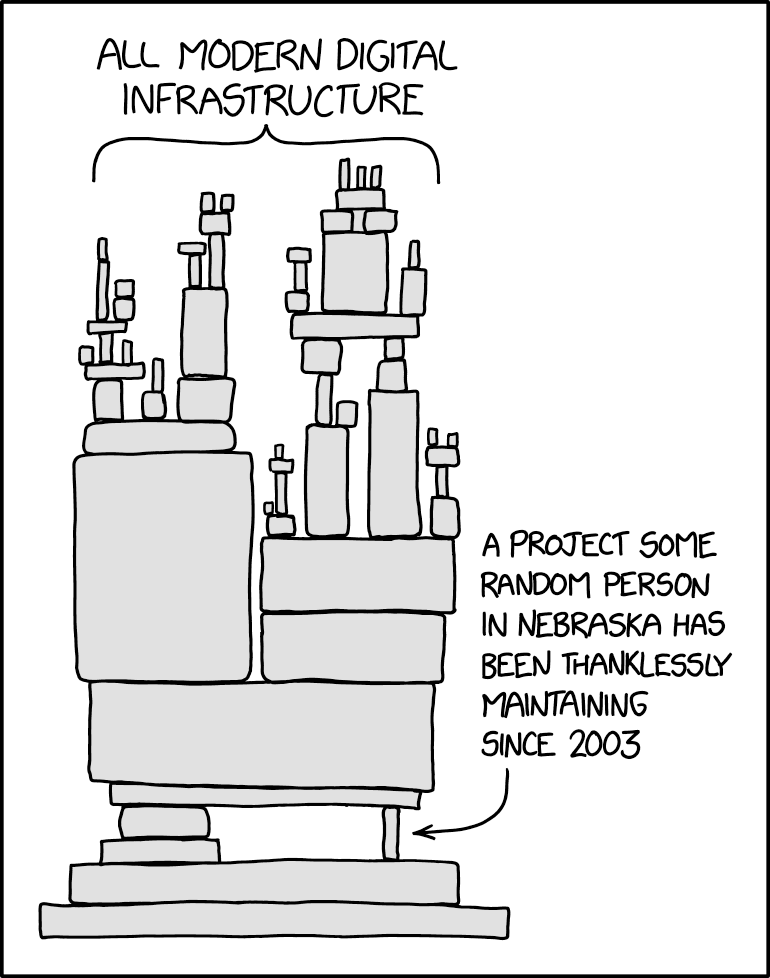
You’ve all seen this XKCD comic, and one of the reasons it’s so popular is that almost everyone identifies with it. Everyone’s project is the tiny brick. No one is getting the support and contributions they need. There are a very small number of big bricks… 80-90% of the stack is tiny bricks thanklessly maintained by one developer. Free Software as a concept is not sustainable if users do not participate.
There are cases where it probably doesn’t make sense to invest the effort needed to maintain a secure LTS. If you’re a desktop user, the path of least resistance is probably to simply use a distribution that releases often enough to provide software that’s still maintained upstream.
But for the cases where LTS is needed, there’s a lot of work that needs to be done and the idea that LTS systems are inherently more secure encourages people to sit back when they need to step up. If you’re not paying for LTS maintenance, there are opportunities for you to contribute everywhere.
If you’re a developer, I encourage you to get involved in the maintenance of software that you use, and one of the easiest ways to do that is to offer to maintain a release branch. Maintaining a release means following development, selecting the patches that stable releases need, cherry-picking them to a release branch, testing them, and publishing releases. Contribution through maintaining a stable release branch is one of the practices that the Linux kernel demonstrates that I’d love to see more projects adopt.
If you’re not a developer, but you want to contribute to distribution security, take part in reviewing CVE reports. Over 40,000 CVE reports were published in 2024 (around 170 per workday), and right now there are probably only a couple of dozen people reviewing those reports and determining whether they apply to the specific configuration used in each distribution. Debian’s security-tracker site has thousands of unassigned security reports for the current stable release. Samuel Henrique delivered a talk titled “The security of Debian” at DebConf ‘25. The recording of that talk is available online and is a good place to start if you’re interested.
Getting those reports classified is not glamorous work, but without CVE applicability data there’s simply no way to use an LTS system safely.
And if you’re not ready to do either of those things yet, at the very least find a vulnerability scanner and start assessing the risks present in your production environments. We have every reason to expect exploit activity to increase, and we are long past the point at which we should be more prepared. What you see may convince you to either deploy more often, or to start participating in the process.
Free Software has always been about participation, and now more than ever, it’s needed.
To finish up, I’ll repeat a few points:
Hope is not a strategy. If you are using a free LTS system, you need to actively evaluate your risks, not hope that someone else is solving the problems that affect your deployment.
Neglect is not a maintenance strategy. Please do not expect that you can safely continue using software after it is no longer maintained.
Unmaintained is not stable. You need to know that someone is actively fixing issues as they are reported.
Silence is not a signal. Use a vulnerability scanner so that you’re getting information about work that has been done and work that needs to be done.
A package manager is not a vulnerability scanner. You need to have both.
Thank you all for coming. I would love to answer your questions.