What does stable mean?
What does “stable” mean? That question is asked pretty frequently, both implicitly and explicitly, in Linux related forums. The question is often asked explicitly by perceptive readers who notice that people seem to mean something not intuitive when they use the term, and I think it’s implicit in common questions like “why do people say that rolling releases are unstable?”
I think it’s an interesting question, and one whose answer I don’t think is well understood.
Stable versions
The simplest answer is that the word “stable” is used by developers and release engineers to describe the life cycle of a product. It communicates the types of changes that they’ll deliver in updates. “Stable” is a promise about the future.
There are different types of changes that developers might make and deliver in future versions, and different mechanisms for communicating to users the types of changes that updates include. One common system is Semantic Versioning, and I think that understanding Semantic Versioning is very helpful in understanding the concept of stability, because “stable” isn’t a binary yes/no quality.
Semantic Versioning is the practice of labeling software releases with a version number consisting of three parts: Major.Minor.Patch. In Semantic Versioning, these numbers are more than just sequences that increase over time; each number has a meaning, and communicates information about the changes relative to other versions. When only the Patch level increments, users should expect no interface changes or new features, only backwards-compatible bug fixes. When the Minor level increments, users should expect that new features or interfaces may have been added, but all of the interfaces from prior versions with the same Major version are still present and compatible. When the Major version increases, then users should expect that interfaces may had been removed or changed in incompatible ways.
Semantic Versioning can describe the releases of a product that are purely linear. This is common for smaller development groups, especially those that don’t have any contractual obligations to continue supporting a release for a pre-determined period of time. But the system is much more useful when multiple release series are maintained concurrently, because this allows developers to support different groups of users according to different needs. When multiple release series are maintained concurrently, we can visualize releases as branches.
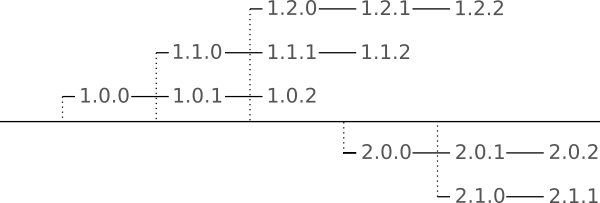
Here, patch releases are linear within a minor release series. Minor release series are branches of major releases, and major releases are branches of the product’s overall life cycle.
Major version and minor version stability
When we classify changes this way, we can also describe different levels or types of stability. Some products explicitly do not offer any interface stability from release to release. Any release might break compatibility with other products. These might have only a major version number, which is incremented with each release. Some products may have major-version stable or backward-compatible stable release series. Any release might include new features. Such a product might use a major and minor version number. And some products have minor-version stable, or feature stable release series. Those products may use the three-component semantic version system to indicate continued releases with a consistent set of features that get only bug fixes.
Distributions are similar, but slightly more complex, because rather than being self-contained products with distinct releases, they tend to be a collection of thousands of bundled components, each of which are updated over time. The distribution doesn’t get a new version number for every package that’s updated. But we can describe similar levels of stability in distributions. Unstable (aka “rolling”) releases will introduce changes that might break backward compatibility whenever they are deemed ready. These distributions typically won’t have a version number at all. There is simply a single continuous stream of updates. Some distributions are major-version stable, or backward-compatible stable. These releases will have a single version number. Users who apply updates within such a distribution may or may not get new features, but the distribution is expected not to publish any changes that would break compatibility with third-party applications during the life of a major release. Distributions might also be minor-version stable, or feature stable. These releases will have a major and a minor version number. Users who apply updates within a minor release should get bug fixes only, and no new features should be published within the life cycle of a minor release.
Note: It’s important to remember that not all versioning systems are semantic. Distributions like Fedora have semantic versions. They have a major version number for each release. Updates within that release might introduce new features, but should not break backward compatibility. Enterprise Linux distributions from Red Hat and SUSE, and Debian Stable releases have semantic versions. New features are periodically introduced to a major release, in the form of a new minor release. However, some distributions use a Year.Month release system, and those are not semantic versions. Some of those additionally have LTS versions that have multiple later “minor” updates to the release, with Year.Month.Minor version numbers. But remember — it’s not the numbering that makes this system semantic, it’s the practice of publishing feature updates only in a new minor release, and most distributions other than Red Hat Enterprise Linux, SUSE Enterprise Linux, and Debian Stable do not maintain that discipline.
Now that we’ve discussed the types or levels of stability, and how versioning can serve to communicate information about a product’s level of stability, we can talk about the implications of different levels of stability, and how different stability levels impact users.
Unstable distributions
Let’s start with unstable distributions. You might ask, if “breaking” changes can ship at any time, how can an unstable distribution be reliable? The answer is that the change that breaks backward compatibility isn’t published on its own. When distribution maintainers prepare a change that will break backward compatibility, they also typically review the packages that will be impacted by the change, and update and rebuild those packages as necessary. Only when the set of updates is ready — the backward-compatibility breaking change and the packages that would be broken — is that whole set published to users. In general, we take for granted that all types of distributions, regardless of their stability level, are fully functional when all packages are up to date. Users who rely entirely on the distribution maintainers for software might never have any application break as a result of updates. But, there is the matter of third-party software. While distribution maintainers can review breaking changes and the distribution’s packages that are affected by them, they can’t review or update applications that end-users have built or installed on their own individual systems. So one of the things that users of unstable distributions must be aware of is that updates from the distribution might break compatibility with applications that aren’t managed in the distribution. Those applications need to be tested after each update, and they might need to be rebuilt or reinstalled.
The other implication that must be considered is that while a system should be fully functional when all packages are up to date, a system might only be fully functional when all packages are up to date. An individual installation of an unstable distribution has no level of assurance that they can update or install any single binary package, because that package might depend on other changes that have been made in the distribution. So to ensure that their systems work reliably, users should always fully update — applying all available packages — and should update before they install any new packages.
Major-version stable distributions
Major-version stable releases, like Fedora, might offer advantages to many users. In these releases, breaking changes are expected only when users upgrade from one major release to another, which means that the indication to users that software they’ve installed from non-distribution sources needs to be re-tested is much more clear, and it happens much less often.
However, like unstable releases, it is actually still the case that only a fully patched system is in a supported state. While it is generally safe and backward-compatible to introduce new features to individual components in a distribution, it does create new and sometimes invisible dependencies.
As an example, let’s imagine a major-version distribution that ships with appFoo 1.0.0, and libBar 1.0.0. Sometime later, libBar is updated to version 1.1.0, which adds a new feature that will be a dependency for any package that’s compiled against that version. After that update, appFoo is also updated, and this update is from 1.0.0 to 1.0.1. Now, if libBar doesn’t use versioned symbols (and many libraries do not), the package manager will know that appFoo depends on libBar, but it may not be able to determine that it depends on libBar 1.1.0, specifically. And that means that if a system had been installed but never updated — if that system had libBar 1.0.0 installed — and if the operator of that system installed appFoo, the package manager might install appFoo version 1.0.1, mistakenly concluding that libBar 1.0.0 was sufficient to satisfy its dependencies. In that case, appFoo might not run at all, or it might run and not work reliably.
As a result, for maximum assurance of consistency, users should always fully update major-version stable systems, and should update before installing any new packages.
Such failures are rare, but they can be extremely difficult to troubleshoot, which brings us to the minor-version stable systems, and the audience that might find them desirable.
Minor-version stable distributions
Minor-version stable releases, like Red Hat Enterprise Linux provide users with a very high level of interface stability. Like major-version stable distributions, breaking changes aren’t published within a release’s life cycle, so third-party applications are expected to remain functional as updates are applied.
Additionally, during the life cycle of a minor release, patches are restricted to very serious bugs and security issues, avoiding hidden dependencies and other types of unwanted changes almost entirely. Since no new features are introduced during a minor release’s life cycle, any combination of packages that are available in a release should fully satisfy all dependencies. That means that end-users who want to select and apply only security patches that apply to their configuration are able to safely do so, which is only the case for feature-stable distributions.
It’s been a long journey; we’ve looked at various levels of stability and their implications for end users. But there’s still one critical point that needs to be made to really understand how life cycles affect users, and especially to understand the value of Enterprise releases.
Parallel lifecycles
Early on, I wrote that the system of Semantic Versioning and stable releases is much more useful when multiple release series are maintained concurrently, because this allows developers to support different groups of users according to different needs. And that point is key to understanding why Enterprise Linux releases are so valuable to a specific audience, and why rebuilds don’t fill that need.
Responsible developers and operations teams test changes before deploying them, especially in safety-critical or revenue-critical environments. Even relatively safe changes commonly found in major-version stable systems and those included in a new minor release of a minor-version stable system could potentially have unintended consequences that require them to be held back until the applications that they support can be adapted to work with the new underlying system. While that work is being done, it is obviously undesirable for a production system not to receive security patches, and for that reason, parallel supported releases are critical to the success of minor-version stable systems. Users of Enterprise Linux distributions, who need maximum stability and security, can continue receiving updates built for the minor release that they’re running in production, while they prepare their applications and environments to update to a new minor release. With no feature updates to create hidden dependencies, they can confidently apply security patches to production systems, and move to a new minor release when they are ready, rather than on a schedule dictated by the platform vendor.
Some stable LTS releases provide minor versions that are feature-stable, such as Debian Stable and rebuilds of RHEL. Some LTS releases don’t provide minor releases at all (or they provide minor releases that are simply checkpoint/rollup releases, and not semantic minor releases at all), such as CentOS Stream or Ubuntu. Opinions on the advantages and disadvantages of this class of distribution vary, but from my point of view, they are all effectively major-version stable. All of these distributions must be fully up to date to be in a supported configuration. For some of them, cherry-picked updates are possible under specific conditions, but only in very narrow windows, and not across the boundaries of minor releases (when they exists). Without parallel minor releases, end users may have to choose between applying a full set of patches that their application isn’t ready for, or not releasing a security patch because its dependencies aren’t met.
Wrapping up
When thinking about interface stability and selecting a distribution for their production use, users should evaluate the amount of time that they need to test minor-version feature updates, in the context of the applications they’ll run on those platforms.
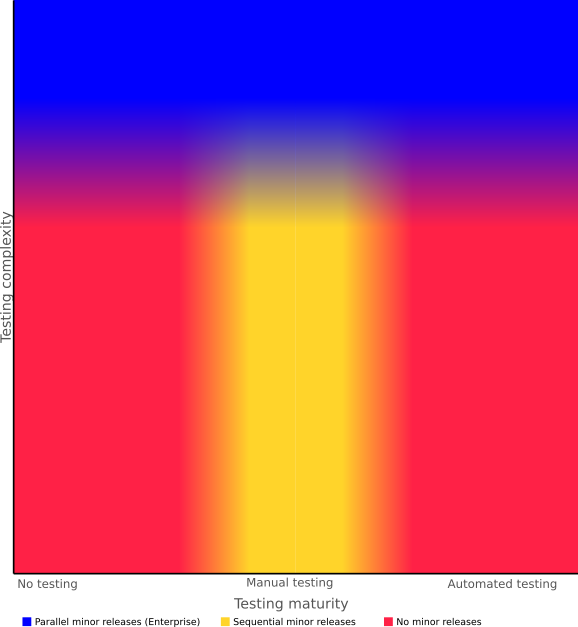
Users who need extensive testing time, those who need flexibility in scheduling their update from one minor release to another, and those who want to selectively apply updates should use an Enterprise Linux release with parallel minor version life cycles. Only a feature-stable system with overlapping life cycles will provide those options.
Users who have no formal testing process, or who have a mature automated testing process may be best served by a distribution without minor releases, where bug fixes are published as they are ready. For these use cases, modern testing practices (or an absence of testing) mean that backward-compatible updates have minimal cost. Rather than providing value, sequential minor releases delay bug fixes that would benefit users.
Users whose applications require testing that is still performed manually or interactively, but aren’t complex enough to justify the cost of an Enterprise distribution might find sequential minor releases more convenient. Batching changes in a minor release reduces the frequency with which testing is required. But beware the myth that these distributions are a substitute for Enterprise distributions or more stable than distributions with no minor releases. For most use cases, these distributions are less reliable than distributions with no minor release, without providing the flexibility in scheduling updates that come with Enterprise releases.
The following graph illustrates one way to view the ideal release model for your use case, based on the complexity of your update tests and the maturity of your testing practices.